




Introduction
Facebook allows users to lock their profiles to control who can see posts, photos, and personal information. Locking your profile increases privacy, making your content visible only to friends, while restricting strangers.
Steps to Lock Your facebook Profile on Mobile
1. Open facebook App
- Launch the Facebook app on your smartphone.
- Ensure you are logged in to the account you want to lock.
2. Go to Your Profile
- Tap your profile picture or name from the homepage.
3. Access Profile Settings
- Tap the three-dot menu (More) next to “Add to Story.”
- Select “Lock Profile” from the options.
4. Confirm Lock
- Facebook will show a summary of changes:
- Only friends can see your photos and posts.
- Profile pictures and cover photos will show only partially to non-friends.
- Tap “Lock Your Profile” to confirm.
✅ Your profile is now locked. Only friends can view your content.
Steps to Lock Your facebook Profile on Desktop
Open facebook.com in your browser.
Go to your profile page.
Click the three-dot menu next to “Edit Profile.”
Select “Lock Profile” and follow the prompts.
What Happens When You Lock Your Profile
Feature
Effect After Locking
Posts
Only friends can see past and future posts
Profile Pictures
Displayed in small size to non-friends
About Info
Limited visibility to public
Timeline
Non-friends cannot post or comment
Stories
Only visible to friends
Additional Privacy Tips
- Review friend list visibility: Settings → Privacy → “Who can see your friends list?”
- Control past post visibility: Limit older posts to friends only.
- Enable two-factor authentication: adds security to your account.
- Be cautious with apps and third-party access: Revoke unnecessary permissions.
Conclusion
Locking your facebook profile is an easy and effective way to boost privacy. It ensures that only trusted friends can view your posts, photos, and personal details, giving you more control over your online presence.
Disclaimer:
The views and opinions expressed in this article are those of the author and do not necessarily reflect the official policy or position of any agency, organization, employer, or company. All information provided is for general informational purposes only. While every effort has been made to ensure accuracy, we make no representations or warranties of any kind, express or implied, about the completeness, reliability, or suitability of the information contained herein. Readers are advised to verify facts and seek professional advice where necessary. Any reliance placed on such information is strictly at the reader’s own risk.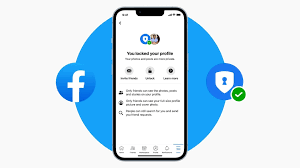
 click and follow Indiaherald WhatsApp channel